

Use the map or zone search on theHiveWindsor to find businesses, events, and creators in your own Windsor–Essex neighborhood, not just the city at large. Results prioritize local reviews and community activity over paid placement, so what surfaces first is what your neighbors actually recommend. Filters and listing instructions follow below.
TL;DR:
- A neighborhood search on theHiveWindsor is more effective when zoomed into specific zones and filtered step-by-step to avoid missing nearby listings.
- Trustworthy listings should have recent, detailed reviews, clear contact information, and matching service hours, with suspicious profiles flagged.
- Building and maintaining a local directory requires ongoing engagement through digital updates and community events to prevent it from becoming inactive.
- Mobile searches favor quick GPS-based results, while desktops are better for comparing options and managing detailed profile updates.
- Claiming and updating existing business listings involves verifying ownership, refreshing hours, photos, and accurately setting neighborhood zones for better visibility.
Table of Contents
- How to search by neighborhood in Windsor
- What makes a neighborhood listing trustworthy?
- How to create a high-impact neighborhood listing on theHiveWindsor
- How to keep a neighborhood directory active
- Does neighborhood search work differently on mobile versus desktop?
- How do I update or claim my existing neighborhood listing?
- A local note from randy: what neighborhood-first discovery changed for my Windsor listings
- Claim your spot on Windsor's neighborhood directory
- Sources
How to search by neighborhood in Windsor
Finding what's actually near you starts with narrowing the map, not scrolling a city-wide feed. Here's the sequence that gets you to relevant results fastest.
- Open theHiveWindsor and center the map on Windsor–Essex. The default view loads the full service area, so the first move is always zooming into your street or district.
- Draw a custom zone or pick a named neighborhood. You can trace a boundary by hand (useful if you live near an edge, like Walkerville bordering Riverside) or select a pre-set area like Olde Sandwich Town or South Windsor.
- Apply filters to cut the noise. Category (restaurant, contractor, tutor, event), hours (open now), price range, and a minimum review count all stack together.
- Read pins versus the list view differently. Pins on the map show quick tags and distance; tapping one opens a card with contact info, a short description, and the most recent review snippet. The list view is better for scanning ten listings at once and comparing hours side by side.
- Save the neighborhood or subscribe to alerts. Once a zone is set, you can save it and get notified when new businesses or events post inside it, so you're not re-running the same search every week.
A few habits make the results tighter:
- Start broad, then narrow. A wide zone shows you what exists; a tight one shows you what's walkable.
- Stack one hard filter at a time (hours, then category) rather than five at once, or you'll filter out legitimate matches.
- Check both the map and list view before deciding nothing's nearby. Some listings only render clearly in one.
Pro Tip: If your neighborhood doesn't have a pre-set zone yet, draw your own and save it. Custom zones often surface hyper-local finds, like a home-based baker three streets over, that a city-wide search buries.
This kind of structured, zone-based approach tends to surface a broader slice of local supply than a generic search engine, which increasingly compresses results into just one or two AI-picked answers instead of showing you the full neighborhood.
What makes a neighborhood listing trustworthy?
Not every listing deserves equal weight, and you don't need to research each one like it's a background check. A few signals do most of the work.
- Recent, specific reviews beat generic praise. "Fixed my fence gate in 20 minutes, showed up on time" tells you more than "Great service!"
- A named contact and a clear service radius matter. Listings with an actual person attached, not just a business name, tend to respond faster.
- Hours and event dates should be treated as hard filters, not suggestions. If a listing says open until 6 PM but a review from last week says otherwise, trust the review.
- Watch for red flags: templated descriptions copied across multiple listings, zero contact info, no activity in months, or hours that contradict the profile photo's posted sign.
Recommendations that come from a neighbor carry a different kind of weight than a stranger's five-star rating on a national platform. Researchers call this "borrowed trust," and it's a documented reason community platforms outperform cold discovery when it comes to lowering the friction of trying someone new. A recommendation from someone three houses down carries more real information than a review from across the city, because they likely share your street conditions, your seasonal needs, and your standards.
How to create a high-impact neighborhood listing on theHiveWindsor
If you run a business, freelance gig, or side hustle in Windsor–Essex, your listing's neighborhood accuracy matters as much as your description does. Here's the sequence that gets results.
- Claim and verify your profile. An unclaimed listing looks abandoned, even if the business is thriving.
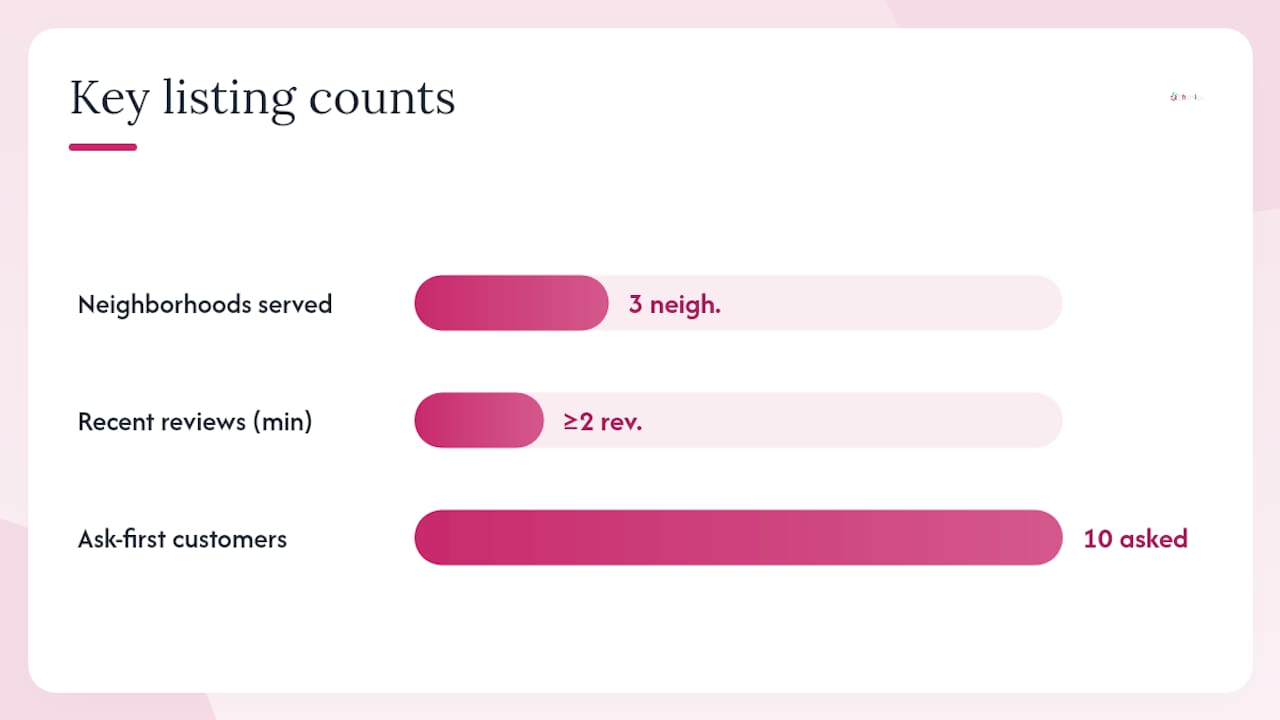
- Set your neighborhood zone(s), service radius, and contact person. If you serve three neighborhoods, list all three rather than picking the city as a whole.
- Add a short origin story and accurate hours. A sentence about why you started matters more than you'd think. It's often the first thing a neighbor reads before deciding to trust you.
- Upload geo-tagged photos and clear categories. A blurry stock photo does less for you than one real image taken at your actual location.
- Post event dates when relevant (a pop-up, a tasting, a workshop) so your listing stays active between transactions.
theHiveWindsor's ranking doesn't run on paid bidding. Visibility comes from community engagement, referral activity, and the quality and recency of reviews, which is a structural difference from platforms where the highest bidder gets top placement.
Neighborhood pages that include a named contact, a real service radius, and at least two recent reviews describing specific work tend to be the ones AI-driven and human searchers both prefer, according to hyperlocal search analysis.
Pro Tip: Ask your first ten customers directly for a review the same day you complete the job, not a week later. Specificity fades fast, and "great job" written a week out is worth less than "replaced my kitchen faucet on a Tuesday morning" written that afternoon.
Small local operations that lean on neighborhood-specific discovery instead of trying to outbid national chains on generic search terms tend to do better with the audience that actually matters: the people already living nearby. Pair your listing with a local visibility checklist and you'll cover most of what the algorithm rewards.
How to keep a neighborhood directory active
A listing that just sits there dies quietly. Directories work when someone treats them like a living thing, not a one-time setup task.
The minimum viable version of this is almost embarrassingly simple: a group chat on WhatsApp or Signal, a shared document listing who does what, and a monthly email digest. Field research on neighborhood networks backs this up directly. Successful ones often launch with as few as a dozen listings and a first event with maybe eight people, then grow from there rather than waiting for scale before starting.
Digital tactics that keep momentum:
- A weekly or biweekly digest featuring two or three providers, so the same three businesses aren't always the ones getting attention.
- Pinned community posts for time-sensitive events.
- Scheduled alerts so subscribers don't have to remember to check back.
Physical tactics matter just as much:
- A monthly marketplace morning, even a small one, gives people a reason to show up in person.
- Door-to-door canvassing when the directory is new, since digital-only growth is slow at first.
- A rotating "directory steward" role, someone who checks in quarterly to refresh listings and prune dead ones.
| Metric to track | Why it matters |
|---|---|
| Referrals sent between neighbors | Shows whether trust is actually spreading |
| Event attendance | Measures whether digital interest converts to real turnout |
| Saved listings | Signals which businesses residents plan to return to |
| Repeat connections | Tracks whether one-time discovery becomes ongoing use |
A quarterly steward check-in and a regular digest cadence are what separate directories that fade after month two from ones still running a year later.
Does neighborhood search work differently on mobile versus desktop?
Yes, and it's worth knowing before you get frustrated trying to draw a precise zone on a five-inch screen. On mobile, theHiveWindsor's map defaults to your current GPS location, which makes it faster to find what's nearby without typing an address. Drawing a custom zone is possible with a finger, but it's less precise than using a mouse, so most mobile users select a pre-set named neighborhood instead of hand-drawing one.
Desktop gives you more room to compare listings side by side in list view, which matters if you're evaluating five contractors at once rather than picking the closest coffee shop. The larger screen also makes filtering easier: stacking category, hours, and review-count filters together is less fiddly with a keyboard and mouse than with touch controls.
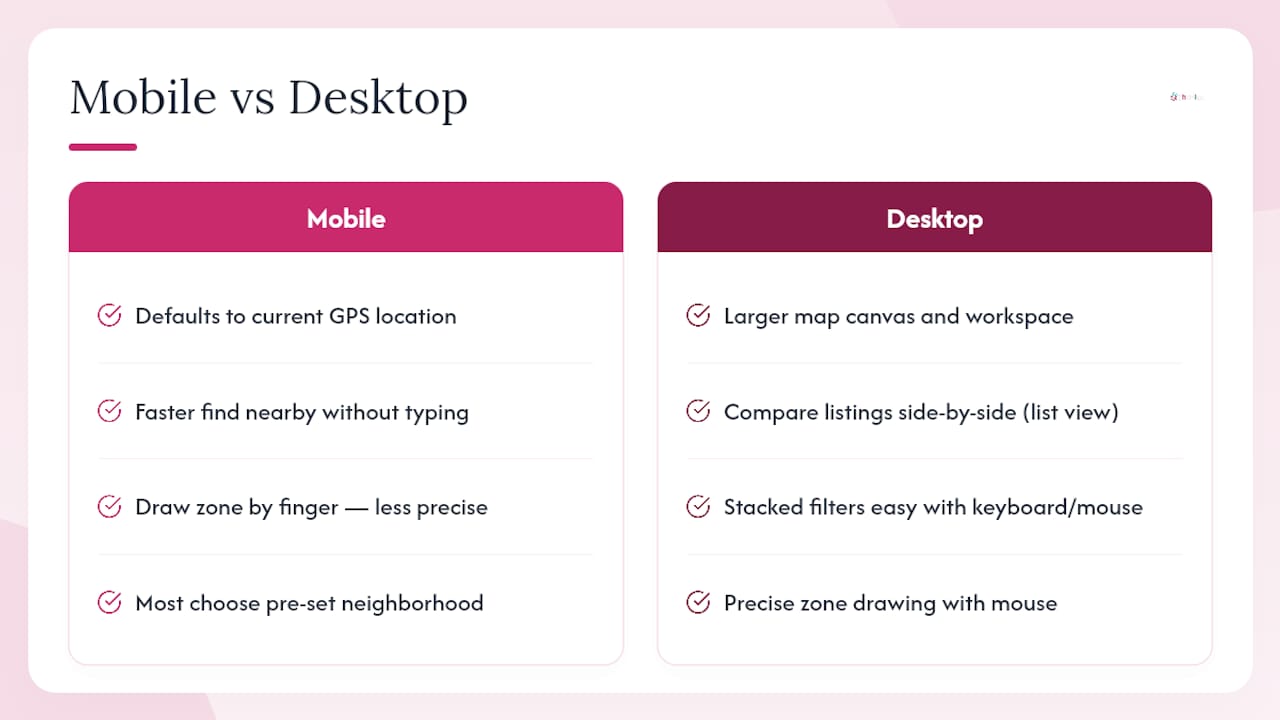
For businesses claiming or managing a listing, desktop is generally the better environment. Uploading multiple geo-tagged photos, writing a longer origin story, and setting a precise service radius are all easier with a full keyboard and a bigger canvas to work on.
Neither version is worse, they're just built for different moments. Mobile suits the "I need something right now, near me" search. Desktop suits the "I'm comparing options and setting up my own listing" task. If you're a resident just browsing, mobile covers almost everything you need. If you're a business owner building out a profile, do the heavy lifting on desktop first, then check how it renders on mobile afterward.
How do I update or claim my existing neighborhood listing?
If your business already appears on theHiveWindsor, whether someone else added it or it was imported from a public directory, claiming it is straightforward. Search your business name or address on the map, open the listing card, and look for the claim option on the profile. You'll need to verify you're the owner or an authorized contact, usually through a quick email or phone confirmation tied to the business.
Once claimed, update these fields first: hours (the most common source of outdated info), your neighborhood zone or service radius if it's wrong, and your contact person's name. Old listings often carry a previous owner's contact details, which confuses customers and hurts trust.
From there, add or refresh photos, since geo-tagged images from the current year read as more credible than a stock photo uploaded years ago. If you're running an event, post the date as soon as it's confirmed rather than waiting until the week before.
If you don't see your business at all, don't assume it's an oversight. Some listings are entirely resident-submitted, and the platform relies on real activity rather than importing every business in the region automatically. Creating a fresh listing from scratch takes roughly the same steps as claiming one, minus the verification back-and-forth. Either way, check your profile every few months. Hours change, staff turn over, and a listing that hasn't been touched in half a year starts looking abandoned even if the business behind it is doing fine.
A local note from randy: what neighborhood-first discovery changed for my Windsor listings
I've written about Windsor's small business scene for years, mostly documenting what neighborhood directories elsewhere got right and wrong. What stuck with me was a resident who needed a dog walker fast, searched her own zone instead of the whole city, and had someone booked within an hour, purely off a neighbor's review from two streets over. That's not luck. That's what happens when a search tool respects the fact that "near me" and "in my city" are two different questions. If you haven't tried drawing your own zone yet, do it this week, and if you run something worth finding, list it.
— randy
Claim your spot on Windsor's neighborhood directory
theHiveWindsor exists because Windsor–Essex residents shouldn't have to jump between five apps to find a dog walker, a Saturday pop-up, or the bakery two streets over, and businesses shouldn't have to outspend a national chain just to get noticed. Ranking here comes from real reviews and community activity, not who paid the most for placement.
Getting started takes minutes: visit theHiveWindsor, create an account, claim your existing listing or start a new one, draw your neighborhood zone, and post your first event or update your hours. If you're a resident, just start searching your own zone and see what's actually around you. Either way, the next step is the same: head to theHiveWindsor and set your neighborhood.
Sources
For more on building and maintaining a neighborhood presence, see local business visibility practices for Windsor–Essex, how community commerce actually works, and the step-by-step guide to claiming your theHive listing.
- Trust and Social Commerce
- The Neighborhood as a Living Marketplace (Understanding eCommerce)
- AI local search audit (Search Engine Journal)
- Hyperlocal SEO in 2026: How AI Compressed the Map Pack into a Single Answer